Useful Articles
Quansheng UV-K5 Handheld Radio
|
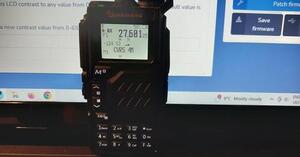
There has been a lot of chat on the Nets about the latest Quansheng UV-K5 handheld.
A few of our Members have managed to purchase one for £10 delivered from the AliExpress website. We have managed to update the firmware on one with the help from the Youtube video (see link to right). It now covers 18MHz to 1300MHz on receive only on AM, FM, LSB and USB. It will still transmit on 2mtrs and 70cms and appears to work very well. A lot of radio and fun for only a tenner! |
|
WebSDR information from David MØVTG
I have been experiencing problems for a week or so with the receiving audio from websdr.org but have found the following solution for those of you who may be finding similar problems. I use Firefox and Windows 10 but I understand that other browsers are having similar problems under both Windows 10 and 11. I can only offer a solution for Firefox and Windows 10 but this may help you solve the same problem elsewhere.
Start Firefox and hit the Tools Tab.
On the drop down box hit Settings.
Select Privacy and Security on left.
Scroll down to Permissions.
Hit Select to the right of Autoplay.
On the pull down menu at the top marked 'Default for all web sites' select 'Allow Audio and Video' and save changes at the bottom.
Close and then restart Firefox, the new settings should now load and give you audio.
73
David
I have been experiencing problems for a week or so with the receiving audio from websdr.org but have found the following solution for those of you who may be finding similar problems. I use Firefox and Windows 10 but I understand that other browsers are having similar problems under both Windows 10 and 11. I can only offer a solution for Firefox and Windows 10 but this may help you solve the same problem elsewhere.
Start Firefox and hit the Tools Tab.
On the drop down box hit Settings.
Select Privacy and Security on left.
Scroll down to Permissions.
Hit Select to the right of Autoplay.
On the pull down menu at the top marked 'Default for all web sites' select 'Allow Audio and Video' and save changes at the bottom.
Close and then restart Firefox, the new settings should now load and give you audio.
73
David
CAT tool for Web SDR from Sid MØSRS
Yaesu FT-991A, FT8 and HRDYaesu FT-991A and HRD
Here are instructions for using FT-8 with HRD. It relies on using a USB cable to make it work and it doesn’t work with anything else. Submitted by Ian MØXCF |

| ||
|
An interesting read for New Licence Holders
Submitted by SID MØSRS |
| ||
Interference from Broadband, etc
https://www.dailymail.co.uk/news/article-8759459/Old-TV-causes-broadband-outages-village-18-months.htm
A short synopsis below:
Alun and Elaine were unaware that their TV was causing broadband issues to villagers living in Aberhosan, Wales, plagued with internet issues every morning. But the problem baffled engineers from Openreach who found their network was working fine. A crack team were called in and found a signal from an old TV set was the cause of problem.
Openreach engineer Michael Jones said the Company's Chief Engineering Team helped to solve the mystery by using a spectrum analyser to look for a phenomenon known as 'Shine' (single high-level impulse noise).
After exhausting their options, they were forced to call in the Openreach Chief Engineering Team in, which is a crack team described as the companys 'SAS' in a bid to fix the problem.
Suzanne Rutherford of Openreach said such issues are not as rare as people may think. 'Anything with electrical components – from outdoor lights to microwaves to CCTV cameras can potentially have an impact on your Broadband connection,' she said.
She advised people to ensure their electrical appliances are properly certified and meet British Standards.
Submited by Sid MØSRS
https://www.dailymail.co.uk/news/article-8759459/Old-TV-causes-broadband-outages-village-18-months.htm
A short synopsis below:
Alun and Elaine were unaware that their TV was causing broadband issues to villagers living in Aberhosan, Wales, plagued with internet issues every morning. But the problem baffled engineers from Openreach who found their network was working fine. A crack team were called in and found a signal from an old TV set was the cause of problem.
Openreach engineer Michael Jones said the Company's Chief Engineering Team helped to solve the mystery by using a spectrum analyser to look for a phenomenon known as 'Shine' (single high-level impulse noise).
After exhausting their options, they were forced to call in the Openreach Chief Engineering Team in, which is a crack team described as the companys 'SAS' in a bid to fix the problem.
Suzanne Rutherford of Openreach said such issues are not as rare as people may think. 'Anything with electrical components – from outdoor lights to microwaves to CCTV cameras can potentially have an impact on your Broadband connection,' she said.
She advised people to ensure their electrical appliances are properly certified and meet British Standards.
Submited by Sid MØSRS
Adding a new callsign to QRZ.com
The QRZ callsign database is updated continuously from a variety of sources. Some rules are observed to ensure that only legitimate amateur radio callsigns are inserted into the database. This article is for those non-USA amateurs who are new to the site and wish to have their callsign added to the database.
The first rule of adding callsigns to the database is that it may only be done by a licensed amateur whose callsign already exists in our database.
This might sound like a problem for someone who is new to the site, however, rest assured that we will do everyting possible to get you listed. If this is your first time on QRZ and you are a non-USA amateur then you must be assisted to get your call sign listed. Getting assistance is easy.
First, any existing QRZ member whose callsign is listed can help you. If you have a friend on QRZ, just ask them to add your callsign and you're done.
If you don't know anyone personally, there is a group of volunteers on the site who are eager to help you out. They are known as our DX Helpers and they have their own Forum area, called Callsign Database Helpers. To get your callsign listed, just post a message in this area by clicking on the New Thread Button and give some basic information about yourself, such as your callsign, your name, your QSL address, etc and one of our DX Helpers will get you fixed up right away.
Info copied from QRZ.COM Website.
The QRZ callsign database is updated continuously from a variety of sources. Some rules are observed to ensure that only legitimate amateur radio callsigns are inserted into the database. This article is for those non-USA amateurs who are new to the site and wish to have their callsign added to the database.
The first rule of adding callsigns to the database is that it may only be done by a licensed amateur whose callsign already exists in our database.
This might sound like a problem for someone who is new to the site, however, rest assured that we will do everyting possible to get you listed. If this is your first time on QRZ and you are a non-USA amateur then you must be assisted to get your call sign listed. Getting assistance is easy.
First, any existing QRZ member whose callsign is listed can help you. If you have a friend on QRZ, just ask them to add your callsign and you're done.
If you don't know anyone personally, there is a group of volunteers on the site who are eager to help you out. They are known as our DX Helpers and they have their own Forum area, called Callsign Database Helpers. To get your callsign listed, just post a message in this area by clicking on the New Thread Button and give some basic information about yourself, such as your callsign, your name, your QSL address, etc and one of our DX Helpers will get you fixed up right away.
Info copied from QRZ.COM Website.
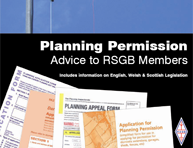
The Radio Society of Great Britain publishes a booklet:
Planning Permission Advice to RSGB Members.
The booklet includes all the information an amateur needs to produce a good planning application and hopefully obtain planning permission. The booklet is made available for Members of the Society.
https://rsgb.org/main/operating/planning-matters/advice-booklet/
What’s in the booklet?
Subjects tackled include:
- Steps before you produce a planning application
- Need for planning permission
- Where to apply
- Fees
- Your Neighbours
- Mobile masts
- Enforcement
The booklet is only available from RSGB Headquarters or to download from Membership Services. As this is a service for Members only it is not available for sale as are other Society publications.
What's My QRA Locator and My W.A.B (Worked All Britain) Square?
What is the QRA locator in amateur radio?
The QRA locator (or Maidenhead locator) is a handy and compact way of transmitting geographical coordinates used by radio amateurs. The main advantage is that the coordinates are expressed with very few characters and this is good for operating in CW. Also used for Contests and VHF , UHF SSB. There is also a Worked All Britain Group that collect Grid Squares for Awards.
There are links below for both the WAB website and QRA Locator Website. The QRA LocatorWebsite will work out your locator, your Grid Square and your WAB Square for you. Good Eh!
The QRA locator (or Maidenhead locator) is a handy and compact way of transmitting geographical coordinates used by radio amateurs. The main advantage is that the coordinates are expressed with very few characters and this is good for operating in CW. Also used for Contests and VHF , UHF SSB. There is also a Worked All Britain Group that collect Grid Squares for Awards.
There are links below for both the WAB website and QRA Locator Website. The QRA LocatorWebsite will work out your locator, your Grid Square and your WAB Square for you. Good Eh!
